
Pokémon Survivor Burst Tools Hub
A checklist for mode gates and a leaderboard decoder—not a fake Pokédex.
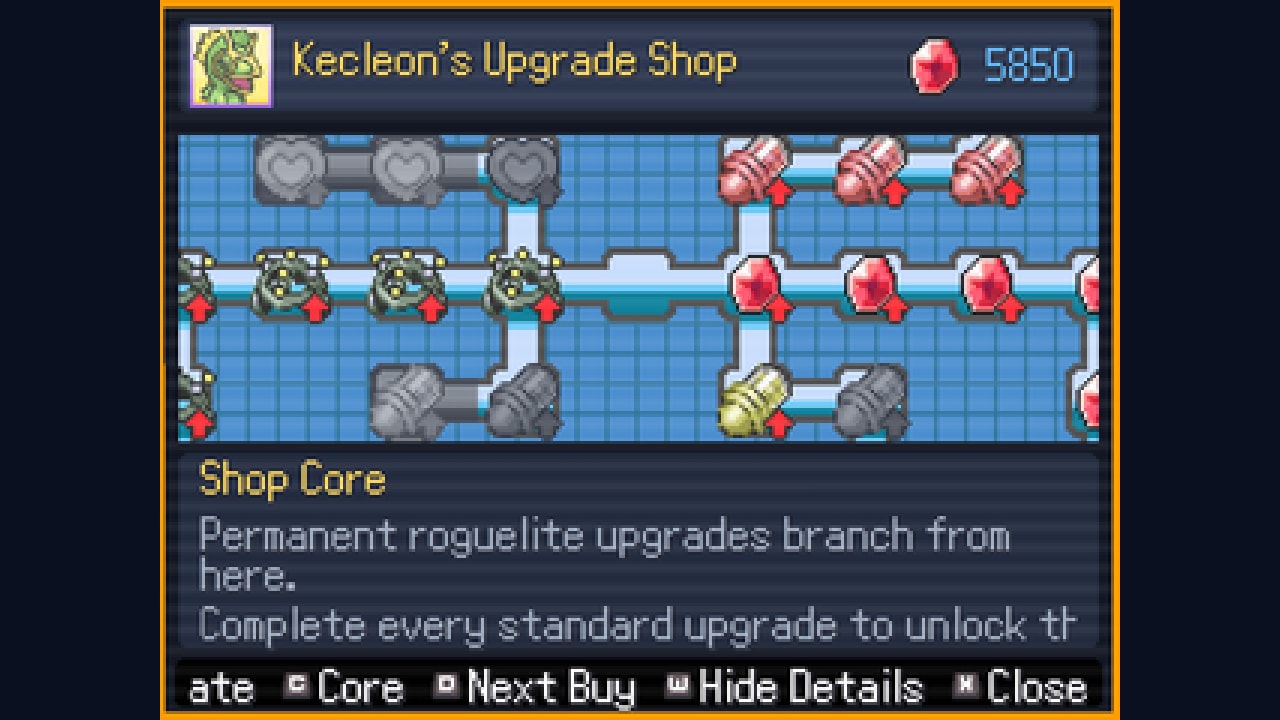
Guides teach the loop. This hub is for the two jobs those guides are bad at: remembering a sequence, and reading a scoreboard. Pokémon Survivor Burst has no in-game quest log that survives a week of Discord pings. Challenge text moves. Mode gates are per Pokémon. The Kecleon tree is permanent. Rankings exist both inside the client and on the web. If you try to hold all of that in your head, you will clear Classic on one starter, forget Rush, and then wonder why Tower is still grey.
Two tools live here on purpose.
The unlock checklist is a workflow: install, name the trainer, clear Classic, clear Rush, clear Tower, open Endless, spend fragments on Kecleon cores, then flag the regional evolutions 4.5 actually named. It is not a complete Pokédex and it will not invent 31 challenge sentences. Live wording belongs in the official Discord and on the unlock challenges page when that page can quote a current prompt.
The leaderboard tool is a decoder for two boards at once: the in-game list (Classic, Pokémon filter, score or level sort, top 100) and the web leaderboard that shows rankings, scores, Pokémon, and runs without launching the game. It also documents the menu keys players actually hit: Mode, Sort on D, Filter on W, Back on C.
When to open a tool instead of a guide
Open a guide when you do not understand a verb. What is Burst. How evolution works. How to install a macOS ZIP without deleting Data. Those answers live under Guides, starting with getting started and download.
Open a tool when you understand the verb and keep dropping the noun. You know Classic unlocks Rush for that Pokémon—you just did it on Mudkip and then queued Pikachu as if the gate was account-wide. You know the board can filter—you just cannot remember whether W is filter or sort. You know Kecleon sells permanent upgrades—you just cannot remember to buy the shop core before you chase a regional form.
That is the split. Game modes explains the chain. The checklist makes you walk the chain on each name. Burst explains the ultimate. The leaderboard page tells you whether the score you posted is even visible under the filter you think you are using.
What these tools assume about version 4.5
Both pages assume the public client is 4.5. Endless exists, it has its own shop and currency, and the mode-select menu is available from the start. Regional forms exist. Kirlia can become Gallade, Quilava can become Hisuian Typhlosion, and Pikachu can become Alolan Raichu, each under specific requirements. Tower access and difficulty were reworked in 4.0, so a v3 screenshot of the gate is not a tool. If your ZIP is older, stop here and read the patch notes before you tick a box that your client cannot offer.
They also assume a named trainer. Player naming arrived in v2.0. The v3.0 compatibility patch exists so that name survives later clients. A checklist that starts after the first Classic clear is lying to you; the first box is always install plus name, because the board will otherwise rank a blank or a reset string. Details sit on the leaderboard page on purpose—the checklist only needs you to treat naming as a required step, not as flavor.
How the two tools talk to the rest of the wiki
The checklist points at starters so you pick someone, at unlock challenges so you know challenges exist, at evolutions so Kecleon and regional flags have a teacher, and at controls so Mode / Sort / Filter / Back are not a mystery if you came from a phone.
The leaderboard page points at best builds only as a warning: a top-100 Mudkip Classic score is not a universal ranking, and copying a filtered run into the wrong mode is how people invent a meta. Use the tier list after you can see which mode and which Pokémon a score belongs to.
Neither tool replaces the Updates Hub. When 4.5 is no longer the live ZIP, the checklist’s Endless box and the board’s Endless tab will need a reread. Until ClessioTV posts a new numbered changelog on the Eevee Expo thread, treat these tools as 4.5 instruments.
What this hub refuses to be
It is not a code list. Burst has no redeemable promo codes. It is not a script dump. It is not a second Pokédex. It is not a live API. The web board is a site you open; this wiki does not scrape it. If the in-game board is down, do what the thread did last time: wait for ClessioTV to say it is back, and use the web page for read-only ranks in the meantime.
It is also not a platform store. Downloads stay on the Links Hub and the download guide. Tools assume you already have a client.
If you are brand new, do not start here. Start with a ZIP, a name, and one Classic clear. Come back when you have two Pokémon and cannot remember which one has Rush. That is the moment a checklist beats another lore paragraph, and the moment a board filter beats staring at an unfiltered top 100.
Use the checklist as a loop you repeat per Pokémon, and the leaderboard as a lens you point at one mode at a time. If you treat either page as a collect-them-all stamp card, you will miss the only rule that actually gates content: Classic, Rush, and Tower are unlocked on the Pokémon that earned them, not on the trainer who watched.
Frequently Asked Questions
Quick answers to the most common questions.
What tools does this wiki actually provide?
Two: an unlock checklist for install, naming, modes, Kecleon, and regional flags, and a leaderboard page for the in-game board plus the web rankings. Neither is a full Pokédex.
Should I use the checklist or the guides first?
If you do not know how to move, Burst, or install, use getting started and the download guide. If you keep forgetting the Classic → Rush → Tower chain, use the checklist.
Does the unlock checklist list every Pokémon?
No. The official thread counts 31 playable Pokémon and says challenges unlock more, but live challenge text belongs on Discord and the unlock challenges page. The checklist is a workflow.
Can I check rankings without launching the game?
Yes. ClessioTV posted a web board at [drchips.fr/leaderboard-SB](https://drchips.fr/leaderboard-SB/) for rankings, scores, Pokémon, and runs. The leaderboard tool explains how it sits next to the in-game list.
Do these tools work on older versions?
They assume version 4.5: Endless, regional forms, and the start-of-game mode menu. If your ZIP is older, read the patch notes before you tick Endless or a Gallade flag.