
Pokémon Survivor Burst Leaderboard
In-game top 100 plus the web board: filter a Pokémon, sort score or level, leave with Back on C.
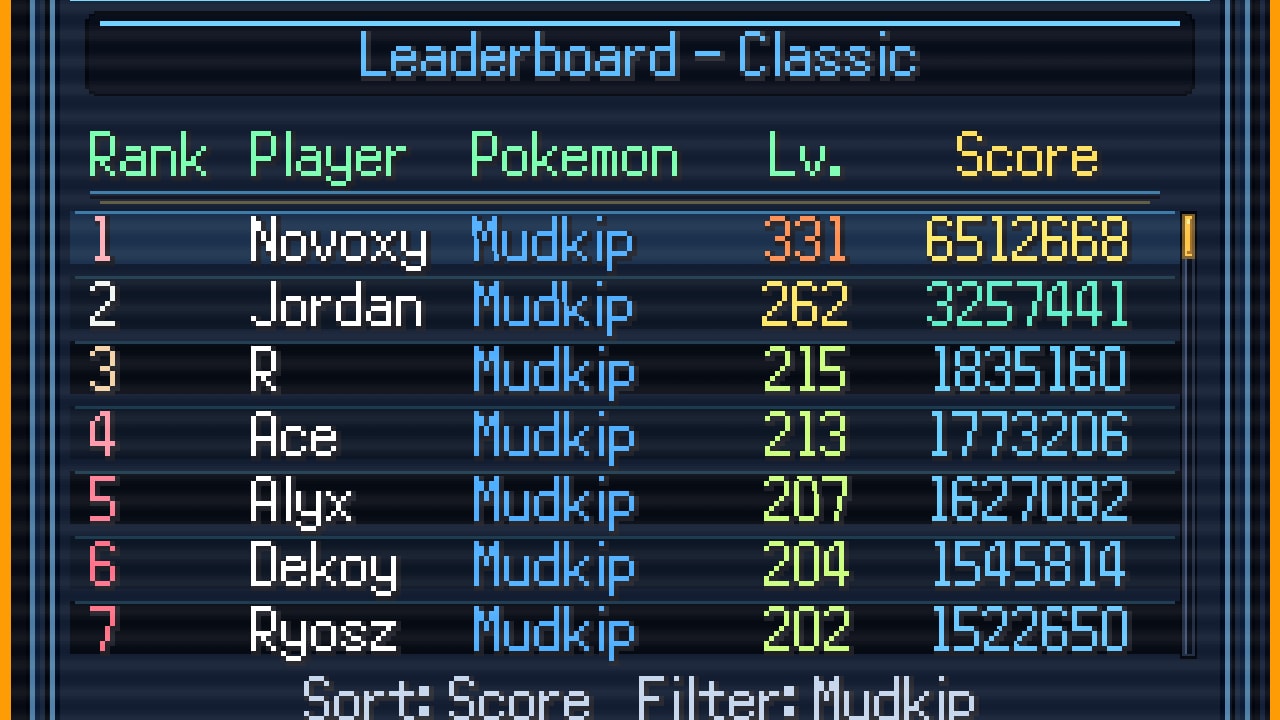
Pokémon Survivor Burst ranks solo runs, not parties. You post a score for one Pokémon in one mode. Everyone else does the same. That is why an unfiltered board looks like noise, and why this page exists: to make the in-game list and the web list answer a specific question instead of a vague “who is best.”
There are two official-enough places to look.
The in-game leaderboard shipped in v2.0, vanished for a stretch after v2.6, then came back. Version 3.0 added score and level sorting, Pokémon filtering, personal-run sorting, and a top 100 display. You use it after a run, with the same name you set in Data.
The web leaderboard is the page ClessioTV posted for people who do not want to launch the client: drchips.fr/leaderboard-SB. It shows rankings, scores, Pokémon used, and player runs. The mode tabs on that site currently read Classique, Rush, Tower, and Endless. Classique is Classic. If you only needed one sentence: you can check ranks from a browser.
Neither board is a tier list. A top Mudkip Classic score does not mean Mudkip is the best Endless pick. Read scores next to the game modes guide and the best builds page, not instead of them.
In-game board — ask a narrow question
Open the leaderboard from the client after you have a name. If the name is blank, stop and fix Data; v3.0’s overwrite-and-keep-Data warning and the later compatibility redownload both exist so this screen can show you.
Then narrow the question before you scroll.
Pick a mode first. Classic, Rush, Tower, and Endless do not share a score physics. Endless did not exist until 4.5 and uses its own shop and currency, so an Endless personal best is not a Classic personal best with extra zeros. If the menu still hides a mode, that Pokémon has not earned it—see the unlock checklist.
Filter a Pokémon. Version 3.0 added Pokémon filtering. The example everyone actually uses on day one is Classic + Mudkip, because Mudkip is the first name a lot of saves touch. Filter Mudkip, then look at score. An unfiltered top 100 is a highlight reel of whoever happened to be strong this week, not a lesson.
Sort on purpose. The same patch added score and level sorting, plus sorting for personal runs. Score answers “how far did this run get in the ranking sense.” Level answers “how long did they live in the upgrade sense.” Personal sort answers “what did I already post.” If you sort level when you meant score, you will copy the wrong run into a build argument.
Trust top 100, not page 40. The board displays the top 100. If you are not on it, you are not on it. Improve the run; do not hunt a hidden page.
Result submission was optimized in v2.5. If a run does not appear, wait, check your connection, and confirm you are on 4.5. Do not immediately assume another outage. The last official outage post was a restore message, not a feature freeze.
Menu keys — Mode, Sort D, Filter W, Back C
The in-game options on this screen are easy to fumble because they share a keyboard with the run.
- Mode cycles the mode you are inspecting. Leave it on the mode you just played before you decide the board “ignored” your score.
- Sort (D) flips the sort. Know whether you are on score or level before you screenshot.
- Filter (W) opens or applies the Pokémon filter. This is the key that turns a Mudkip lesson into a usable one.
- Back (C) leaves the board. If you came from a phone or a controller, confirm the same actions on the controls page instead of mashing the run keys.
If a key does nothing, you are probably still in a results overlay, not the board itself. Close the overlay, open the leaderboard, then use D / W / C. The v4.5 mode-select menu being available from the start does not replace this screen; it only makes it more likely you queued the wrong mode on purpose.
Web board — ranks without launching
Use the web page when you are at work, on a phone that cannot run the under-tested mobile build, or comparing a friend’s claim without booting RPG Maker. It is read-only. It will not submit a run for you. It will not spend Kecleon fragments. It will not unlock Rush.
What it is good at:
- Confirming that a mode tab exists (if Endless is missing, you are looking at a stale cache or an older scrape—refresh).
- Seeing which Pokémon populate the top of a mode without standing in the in-game filter.
- Checking whether your name exists at all after a Data scare.
What it is bad at:
- Teaching Burst. For that, use the Burst guide.
- Explaining why a Pokémon is up there. For that, use starters and best builds.
- Replacing Discord when the in-game board is actually down. The restore post last time came from ClessioTV on the Eevee Expo thread, not from the web page’s loading spinner.
If the web page sits on “Loading Leaderboard…,” refresh once, then wait. Do not post a death notice in Discord after ten seconds. The previous outage was real and temporary. Treat a spinner as a spinner.
How to post a score that means something
- Play on 4.5 so Endless and regional forms are even legal.
- Keep Data so the name matches last week’s name.
- Finish the run in the mode you care about. Do not mix a Tower Fragment clear with a Classic flex.
- Open the in-game board, set Mode, press W to filter your Pokémon, press D until the sort matches the question, look for yourself inside the top 100.
- Only then paste a screenshot. An unfiltered screenshot is how arguments start.
If you want the rest of the wiki to stay honest, quote the filter in the screenshot caption: “Classic, Mudkip, sort score.” That one line does more for a tier list discussion than a cropped HUD.
The Tools Hub is the index for this page and the checklist. Use the checklist to earn the mode; use this page to read the mode. If you reverse that order, you will stare at a grey Rush filter and blame the board.
Leave with C when you are done. The swarm does not pause because you found a better Mudkip on page one of Classic.
Frequently Asked Questions
Quick answers to the most common questions.
Where is the web leaderboard?
ClessioTV posted it at [drchips.fr/leaderboard-SB](https://drchips.fr/leaderboard-SB/). It shows rankings, scores, Pokémon, and runs without launching the game. Mode tabs include Classic (labelled Classique), Rush, Tower, and Endless.
How do I filter the in-game board to Mudkip in Classic?
Open the leaderboard, set Mode to Classic, then use Filter on W to pick Mudkip. Sort with D if you want score versus level. Back out with C. Details on keys also sit in controls.
Why is my run missing from the top 100?
The in-game board shows the top 100. You may be outside it, on the wrong mode, or unfiltered next to stronger Pokémon. Confirm 4.5, confirm your name, then check the [web board](https://drchips.fr/leaderboard-SB/) as a second view.
Was the leaderboard taken down for good?
No. It went down after v2.6 and ClessioTV posted that it was back. If it fails again, wait for a thread or Discord note rather than assuming the feature was removed.
Does a high score mean that Pokémon is S-tier?
Not by itself. Scores are per mode and per Pokémon. Use the tier list and best builds after you know which filter produced the number.
Do I need a special code to post a score?
No. There is no redeemable promo code. You need a named trainer, a finished run, and a working submit. Naming and Data notes are in the unlock checklist.